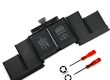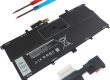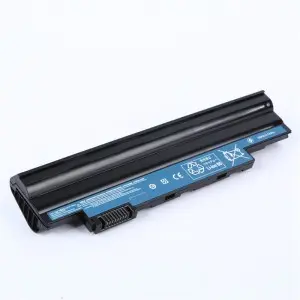
Short Answer: Absolutely yes. Since the early 2000s, lithium-ion (Li-ion) and lithium-polymer (Li-polymer) batteries have been the exclusive and universal standard for powering laptops across all brands (Dell, HP, Lenovo, Apple, Asus, Acer, Microsoft, Samsung, etc.). Older battery technologies like Nickel-Cadmium (NiCd) or Nickel-Metal Hydride (NiMH) are completely obsolete for modern laptops due to significant disadvantages.
Table of Contents
ToggleWhy Lithium? The Technological Dominance Explained
Lithium batteries became the undisputed champion for portable electronics, especially laptops, due to a combination of critical advantages over previous technologies:
Exceptional Energy Density: This is the primary reason. Lithium batteries pack significantly more electrical energy into a smaller size and lighter weight than NiCd or NiMH. This is essential for making laptops thin, light, and portable while still offering reasonable battery life (e.g., 5-15+ hours).
High Voltage per Cell: A single lithium cell provides about 3.6-3.7 volts (nominal), compared to 1.2V for NiCd/NiMH. This means fewer cells are needed to achieve the typical laptop battery voltage (often 11.1V, 14.4V, or 14.8V), simplifying battery pack design and saving space/weight.
Low Self-Discharge Rate: Lithium batteries lose charge very slowly when not in use (typically 1-5% per month), unlike NiMH which could lose 10-30% per month. You can leave your laptop unused for weeks and still find usable charge.
No Memory Effect: Unlike NiCd and to a lesser extent NiMH, lithium batteries do not suffer from the “memory effect.” You do not need to fully discharge them before recharging. Partial charges are actually preferable for longevity.
Relatively Low Maintenance: Beyond basic care (avoiding extreme heat/cold, avoiding deep discharges), lithium batteries require minimal user maintenance compared to older technologies.
The Two Flavors: Li-ion vs. Li-polymer in Laptops
While both are lithium-based and share core chemistry, there are key differences in construction:
Lithium-ion (Li-ion):
Construction: Uses a liquid organic electrolyte and a rigid metal (usually aluminum) cylindrical or prismatic cell casing.
Pros: Mature, reliable technology. Generally offers the highest possible energy density per dollar (cost-effective capacity). Excellent cycle life.
Cons: Slightly heavier and bulkier than Li-polymer due to the rigid casing. Shape limitations (cylinders or rectangles).
Laptop Use: Very common, especially in mainstream and performance laptops where maximum capacity within a reasonable thickness is key. Often found as removable rectangular packs.
Lithium-polymer (Li-polymer or LiPo):
Construction: Uses a semi-solid (gel) or solid polymer electrolyte and a flexible, foil-type pouch casing.
Pros: Extremely thin and flexible form factor. Lighter weight than equivalent capacity Li-ion. Can be manufactured in custom, space-efficient shapes to fit sleek laptop designs. Generally considered slightly safer in terms of electrolyte leakage (gel/solid vs. liquid).
Cons: Historically had slightly lower energy density than Li-ion (though this gap has narrowed significantly). Slightly more expensive to manufacture. Can be slightly more prone to physical swelling over time.
Laptop Use: Dominant in ultra-thin laptops (Ultrabooks, MacBook Air), tablets, and devices where minimal thickness and weight are paramount. Very common as non-user-replaceable, glued-in batteries.
Which One Does Your Laptop Have?
Most modern thin-and-light laptops (especially MacBooks, Dell XPS, HP Spectre, Lenovo Yoga) use Li-polymer batteries integrated into the chassis.
Many mainstream and gaming laptops might use Li-ion cells, often in a removable rectangular pack or semi-integrated modules.
Crucially: Both types are “lithium batteries” and offer the core advantages listed above. The choice between them is primarily driven by the laptop manufacturer’s design goals (thinness vs. peak capacity vs. cost).
Important Considerations & Drawbacks
While lithium batteries are the best solution available, they aren’t perfect:
Degradation (Capacity Fade): All lithium batteries degrade over time and with use. Their capacity gradually decreases:
Cycle Aging: Each full charge/discharge cycle (or equivalent partial cycles) causes wear. A typical laptop battery is rated for 300-1000 full cycles before reaching 70-80% of its original capacity.
Calendar Aging: Even if unused, capacity slowly decreases due to chemical reactions within the cells. High temperatures significantly accelerate this.
Heat Sensitivity: High temperatures (above 30°C / 86°F, especially above 40°C / 104°F) are the #1 enemy of lithium batteries, drastically accelerating degradation. Using the laptop on a soft surface blocking vents or heavy gaming/sustained high CPU load while on battery can cause heat buildup.
Deep Discharge Risk: Allowing the battery to drain to 0% and stay there for extended periods can cause permanent damage and potentially render it unusable. The laptop’s Battery Management System (BMS) usually prevents complete discharge to a dangerous level.
Safety Concerns (Mitigated but Present): Lithium batteries contain flammable electrolytes. If severely damaged, defective, or subjected to extreme conditions (puncture, overcharge, overheating), they can potentially catch fire or explode in rare instances (“thermal runaway”). Crucially, modern laptop batteries incorporate multiple safety features:
Battery Management System (BMS): A dedicated circuit that monitors voltage, current, and temperature of each cell/module. It prevents overcharging, over-discharging, excessive current draw, and overheating. It also balances cells for optimal performance.
Physical Protections: Robust casings (especially for Li-ion), safety vents, and sometimes flame-retardant materials.
Swelling: Li-polymer batteries in particular can swell over time due to gas generation from degradation or minor internal faults. This is a sign the battery needs replacement and can potentially damage the laptop casing.
Best Practices for Laptop Lithium Battery Longevity
Avoid Extreme Heat: Don’t use on beds/blankets blocking vents. Keep out of hot cars. Manage heavy workloads.
Avoid Deep Discharges: Try not to regularly drain below 20%. Plug in when convenient.
Partial Charging is Fine: Modern BMS handles it. Charging from 40% to 80% is less stressful than 0% to 100%.
Long-Term Storage: If storing unused for months, charge to around 40-60% and power down. Store in a cool place.
Don’t Constantly Keep at 100%: If plugged in 24/7 for long periods (like a desktop replacement), some manufacturers offer “Battery Health” or “Optimized Charging” software (e.g., Apple, Lenovo, Dell) that learns your usage and holds the charge at 80% until needed. If yours doesn’t, occasionally using battery power is beneficial.
Are There Any Alternatives in Laptops Today?
No. For the reasons outlined above (energy density, weight, voltage), there are currently no viable commercial alternatives to lithium-based batteries (Li-ion or Li-polymer) for mainstream consumer and business laptops.
Future Potential: Research is intense on next-gen batteries (Solid-State Lithium, Lithium-Sulfur, Sodium-ion) promising higher energy density, faster charging, and improved safety. However, these are still primarily in the lab or early niche applications and years away from mass adoption in laptops.
Conclusion
The answer is unequivocal: Yes, every single laptop manufactured and sold today uses either a Lithium-ion (Li-ion) or Lithium-polymer (Li-polymer) battery. This shift, completed over two decades ago, was driven by lithium’s unmatched combination of high energy density, light weight, low self-discharge, and lack of memory effect – essential characteristics for portable, powerful computing. While they require some basic care (mainly avoiding heat and deep discharges) and naturally degrade over time, lithium batteries remain the indispensable power source that makes modern laptop mobility possible. Understanding the type (Li-ion vs. Li-polymer) and following best practices can help maximize the lifespan and performance of your laptop’s battery.

- Top 10 Laptop Battery Suppliers In China - August 27, 2025
- Top 10 Laptop Battery Suppliers In The UK - August 27, 2025
- How To Replace iPhone Battery: A Comprehensive Guide - August 21, 2025